
ซอฟต์แวร์ (Software)
โซลูชันตามแบรนด์ (Brand-Specific Solutions)
-
 Minitab Solution(โซลูชันวิเคราะห์ข้อมูลสถิติเชิงลึก)
 -
 Easeus(โซลูชันกู้ สำรองข้อมูล | งานเอกสาร | มัลติมีเดีย)
 -
 Canva Business & Enterprise(โซลูชันออกแบบและสื่อสารด้วยภาพสำหรับองค์กร)
 -
 TeamViewer(โซลูชันควบคุมคอมพิวเตอร์ และทำงานระยะไกล)
 -
 GstarCAD(โซลูชัน CAD ออกแบบ 3D และ 2D)
 -
 Google Workspace(โซลูชันอีเมลและเครื่องมือทำงานสำหรับธุรกิจ)
 -
 ChatGPT Business(โซลูชัน AI สําหรับธุรกิจ ผู้ช่วยทุกแผนกในองค์กร)New
โซลูชันตามการใช้งาน (Specialized Solutions)
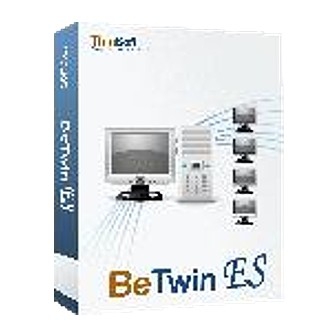
ขาย Betwin ลิขสิทธิ์แท้
Betwin
(โปรแกรมทำให้ คอมพิวเตอร์ เครื่องเดียว ใช้งานได้หลายคนพร้อมกัน)
Perpetual License
Perpetual License คืออะไร ?
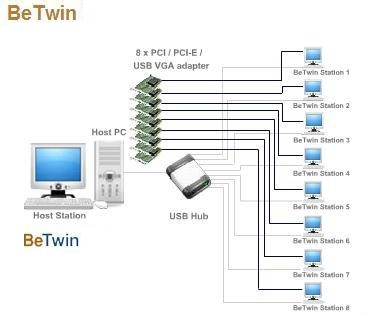
Betwin มันเป็น โปรแกรมอรรถประโยชน์ หรือ โปรแกรมยูทิลิตี้ (Utility Software) ที่ทำให้ผู้ใช้ตั้งแต่ 2 คน ใช้งานจาก PC เพียงเครื่องเดียว (คอมพิวเตอร์หลัก 1 เครื่อง เชื่อมต่อ จอ/คีย์บอร์ด/เมาส์ เพิ่มได้อีก 8 ชุด ทำให้ 9 คนสามารถร่วมกันใช้งานคอมพิวเตอร์เครื่องเดียว) โดยเพิ่ม เมาส์ คีย์บอร์ด USB และการ์ดจอ PCI /การ์ดจอที่ทำงานได้ 2 จอ ตามจำนวนผู้ใช้งาน และสามารถใช้งานโปรแกรมเดียวกันพร้อมๆ กัน หรือทำงานที่ต่างกันก็ได้ เช่นจอหนึ่งใช้งาน โปรแกรม Microsoft Excel อีกจอหนึ่งดูหนังจากแผ่นซีดีรอม (CD-ROM) เป็นต้น และสามารถใช้งานบนระบบปฏิบัติการของ Windows Vista / 7 / 8 / 8.1 (ตามเวอร์ชันของโปรแกรม)
สำหรับผู้ดูแลระบบคอมพิวเตอร์ในองค์กรธุรกิจ (System Administrator) หรือแม้แต่ผู้ใช้งานตามบ้าน ที่ต้องการให้หลายๆ คน ร่วมกันใช้งานคอมพิวเตอร์เครื่องเดียวได้ ก็สามารถหาซื้อลิขสิทธิ์แท้ของ โปรแกรมทำให้คอมพิวเตอร์เครื่องเดียว ใช้งานได้หลายคนพร้อมกัน Betwin จาก Thaiware Shop ร้านขาย สินค้าไอที ออนไลน์แล้ววันนี้
โปรแกรมทำให้คอมพิวเตอร์เครื่องเดียว ใช้งานได้หลายคนพร้อมกัน Betwin มีทั้งหมดกี่เวอร์ชัน ?
1. BeTwin ES (32-Bit)
รองรับการติดตั้งใช้งานบนระบบปฏิบัติการ Windows 8/8.1 เวอร์ชัน 32-Bit (ไม่รองรับการใช้งานกับ Windows RT)
2. BeTwin ES (64-Bit)
รองรับการติดตั้งใช้งานบนระบบปฏิบัติการ Windows 8/8.1 เวอร์ชัน 64-Bit (ไม่รองรับการใช้งานกับ Windows RT)
BeTwin VS (32-Bit)
รองรับการติดตั้งใช้งานบนระบบปฏิบัติการ Windows Vista (Home Basic, Home Premium, Business และ Ultimate Edition) และ Windows 7 เวอร์ชัน 32-Bit โดยการใช้งานบน Windows 7 จะรองรับการทำงานร่วมกับอุปกรณ์ เมาส์ปากกา และหน้าจอสัมผัสหลายรุ่น อาทิ
- เมาส์ปากกา Wacom Bamboo Tablet (รุ่น Wacom Bamboo CTH-460)
- เมาส์ปากกา Q-PAD Pen Input Device
- เมาส์ Microsoft Touch Mouse (รุ่น Microsoft Touch Mouse 3KJ-00005)
- รองรับฟีเจอร์การสั่งงานผ่านหน้าจอสัมผัสของ Windows 7
BeTwin VS (64-Bit)
รองรับการติดตั้งใช้งานบนระบบปฏิบัติการ Windows Vista (Home Basic, Home Premium, Business และ Ultimate Edition) และ Windows 7 เวอร์ชัน 64-Bit โดยการใช้งานบน Windows 7 จะรองรับการทำงานร่วมกับอุปกรณ์ เมาส์ปากกา และหน้าจอสัมผัสหลายรุ่น อาทิ
- เมาส์ปากกา Wacom Bamboo Tablet (รุ่น Wacom Bamboo CTH-460)
- เมาส์ปากกา Q-PAD Pen Input Device
- เมาส์ Microsoft Touch Mouse (รุ่น Microsoft Touch Mouse 3KJ-00005)
- รองรับฟีเจอร์การสั่งงานผ่านหน้าจอสัมผัสของ Windows 7
คุณสมบัติ และ ความสามารถ (Features)
ติดตั้งง่าย
การติดตั้ง โปรแกรมทำให้คอมพิวเตอร์เครื่องเดียว ใช้งานได้หลายคนพร้อมกัน Betwin ก็ทำได้อย่างง่ายดาย เมื่อคุณมีเครื่องคอมพิวเตอร์ที่ได้ตามมาตรฐานขั้นต่ำของ Betwin แล้ว คุณเพียงหาจอมอนิเตอร์, USB คีย์บอร์ด, USB เมาส์ และซอฟต์แวร์ Betwin มาทำการติดตั้งก็สามารถใช้งานได้ภายในไม่เกิน 10 นาที
ใช้งานคอมพิวเตอร์ได้เป็นอิสระจากกัน
โปรแกรมทำให้คอมพิวเตอร์เครื่องเดียว ใช้งานได้หลายคนพร้อมกัน Betwin ทำให้ผู้ใช้งานทุกคนสามารถเข้าถึงอินเทอร์เน็ตเว็บไซต์ และเข้าถึงแอคเคาน์อีเมลของแต่ละคนได้อย่างเป็นอิสระต่อกัน ในสภาพแวดล้อมการใช้งานบนหน้าเดสก์ทอปที่สามารถปรับแต่งได้แบบเฉพาะตัว
ทำงานกับโปรแกรมต่างๆ ได้ไม่ต่างอะไรกับคอมพิวเตอร์ปกติ
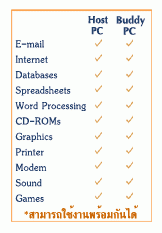
โปรแกรมทำให้คอมพิวเตอร์เครื่องเดียว ใช้งานได้หลายคนพร้อมกัน Betwin ทำให้ผู้ใช้งานแต่ละคนสามารถใช้งานโปรแกรมที่เกี่ยวกับการทำงาน และโปรแกรมทั่วๆ ไปได้ไม่ต่างอะไรกับการใช้งานเครื่องคอมพิวเตอร์ตามปกติ และสามารถใช้งานโปรแกรมเดียวกันพร้อมๆ กัน หรือทำงานที่ต่างกันก็ได้ เช่นจอหนึ่งใช้งาน โปรแกรม Microsoft Excel อีกจอหนึ่งดูหนังจากแผ่น CD-ROM เป็นต้น ในส่วนของเนื้อที่จัดเก็บไฟล์ข้อมูล จะเป็นการจัดเก็บแบบรวมศูนย์ทั้งสำหรับเครื่อง Host (ที่ใช้ติดตั้งระบบ Betwin) และเครื่องคอมพิวเตอร์เสมือนสำหรับผู้ใช้งานแต่ละคน
คุณสมบัติเด่นของ โปรแกรม Betwin
- การทำงานของแต่ละหน้าจอเป็นอิสระจากกัน
- เล่นมัลติมีเดียอิสระจากกัน
- ปลอดภัยจากอาการแฮงก์ทั้งสองจอ
- ทำงานภายใต้ระบบรักษาความปลอดภัยของ Microsoft
- ลดต้นทุนทางด้านไอทีเมื่อเทียบกับการอัปเกรดเครื่องทั่วไป
- ลดค่าใช้จ่ายและความสับสนทางด้านเครือข่ายได้
- ประหยัด IP Address และลดค่าใช้จ่ายจากการใช้อินเทอร์เน็ตหลายรหัสผู้ใช้
- ประหยัดเวลาจากการติดตั้งซอฟต์แวร์/การสแกนไวรัส
- ประหยัดพลังงานไฟฟ้าและลดปริมาณความร้อนในห้อง
- ประหยัดพื้นที่ในการวางชุดคอมพิวเตอร์
ความต้องการของระบบ (System Requirements)
BeTwin ES (32-Bit)
- OS : Windows 8/8.1 (32-Bit) computer (Windows RT is not supported)
- CPU :
- Pentium IV 2.8 GHz or faster processor is the minimum recommendation
- For better performance, multi-core processor is suggested
- Equivalent AMD processors are also supported
- RAM :
- minimum requirement for 2 users is 1 Gigabyte of RAM
- 256 MB. of additional RAM or more is recommended for each additional user
- Graphic Card :
- The following are the ATi PCI-E DualHead/DualView VGA card tested to be working on the BeTwin Station :
- Radeon HD 4350
- Radeon HD 6850
- Radeon HD 6670
- The following are the nVidia PCI-E DualHead/DualView VGA cards tested to be working on the BeTwin Station :
- GeForce 6600GT
- GeForce 6800GT
- GeForce 7100GS
- GeForce 8600GT
- GeForce 7100GS
- GeForce 9300GE
- GeForce GT 240
- GeForce GT 520
- GeForce GT 440
- GeForce GTS 250
- The following is the USB video adapter tested to be working on the BeTwin Station :
- DisplayLink USB VGA Adapter
- The following are the ATi PCI-E DualHead/DualView VGA card tested to be working on the BeTwin Station :
- PCI-E, DualView or USB VGA adapter
- Available PCI-E slot if PCI-E VGA card is to be used for Station
BeTwin ES (64-Bit)
- OS : Windows 8/8.1 (64-Bit) computer (Windows RT is not supported)
- CPU :
- Pentium IV 2.8 GHz or faster processor is the minimum recommendation
- For better performance, multi-core processor is suggested
- Equivalent AMD processors are also supported
- RAM :
- minimum requirement for 2 users is 2 Gigabyte of RAM
- 256 MB. of additional RAM or more is recommended for each additional user
- Graphic Card :
- The following are the ATi PCI-E DualHead/DualView VGA card tested to be working on the BeTwin Station :
- Radeon HD 4350
- Radeon HD 6850
- Radeon HD 6670
- The following are the nVidia PCI-E DualHead/DualView VGA cards tested to be working on the BeTwin Station :
- GeForce 6600GT
- GeForce 6800GT
- GeForce 7100GS
- GeForce 8600GT
- GeForce 7100GS
- GeForce 9300GE
- GeForce GT 240
- GeForce GT 520
- GeForce GT 440
- GeForce GTS 250
- The following is the USB video adapter tested to be working on the BeTwin Station :
- DisplayLink USB VGA Adapter
- The following are the ATi PCI-E DualHead/DualView VGA card tested to be working on the BeTwin Station :
- PCI-E, DualView or USB VGA adapter
- Available PCI-E slot if PCI-E VGA card is to be used for Station
BeTwin VS (32-Bit)
- OS :
- Windows Vista (Home Basic, Home Premium, Business or Ultimate Edition - 32-Bit)
- Windows 7 (32-Bit)
- CPU : Pentium IV 2.8GHz or faster
- RAM :
- For Windows Vista (32-Bit) or Windows 7 (32-Bit), the minimum requirement for 2 users is 1 Gigabyte of RAM
- For Windows Vista or Windows 7 Aero enabled, the minimum requirement for 2 users is 1.5 Gigabytes of RAM
- 256 MB. of additional RAM or more is recommended for each additional user
- Graphic Card for Windows 7 (32-Bit) :
- PCI VGA Cards :
- ATi Radeon 9250
- ATi Radeon X1550
- ATi Rage XL
- nVidia GeForce FX5200
- nVidia Quadro NVS 280
- ThinNetworks TN-502
- PCI-E VGA Cards :
- ATi Radeon HD 2600 PRO
- ATi Radeon HD 4350
- ATi Radeon HD 6850
- ATi Radeon HD 6670
- ATi Radeon X1550
- ATi Radeon X1650
- nVidia GeForce 6600 GT
- nVidia GeForce 6800 GT
- nVidia GeForce 7100 GS
- nVidia GeForce 8600 GT
- nVidia GeForce 9300GE
- nVidia GeForce GT 240
- nVidia GeForce GT 520
- nVidia GeForce GT 440
- nVidia GeForce GTS 250
- nVidia Quadro
- ThinNetworks TN-750
- USB VGA Adapter :
- MCT USB VGA Adapter (Model UVGA-A8201, Trigger 1+)
- MCT USB VGA Adapter (Model UV-A8301, Trigger II)
- MCT USB VGA Adapter (Model MWS8940, Trigger II)
- DisplayLink USB VGA Adapter
- Dual Head/DualView VGA Cards :
- ATi Radeon HD 2600 PRO DualView
- ATi Radeon HD 4350 DualView
- ATi Radeon HD 6850 DualView
- ATi Radeon HD 6670 DualView
- nVidia GeForce 6600GT DualView
- nVidia GeForce 7100GS DualView
- nVidia GeForce 8600GT DualView
- nVidia GeForce 9300GE DualView
- nVidia GeForce GT 240 DualView
- nVidia GeForce GT 440 DualView
- nVidia GeForce GT 520 DualView
- nVidia GeForce GTS 250 DualView
- ThinNetworks TN-750 DualView
- ThinNetworks TN-502 DualView
- PCI VGA Cards :
- Graphic Card for Windows Vista (32-Bit) :
- PCI VGA Cards :
- ATi Rage XL
- ATi Radeon - all models
- nVidia GeForce - all models
- nVidia Quadro
- ThinNetworks TN-502
- PCI-E VGA Cards :
- ATi Radeon
- nVidia GeForce
- nVidia Quadro
- USB VGA Adapter :
- MCT USB VGA Adapter (Model UVGA-A8201, Trigger 1+)
- PCI VGA Cards :
- PCI, PCI-E, Dual Head/DualView (only applicable to Windows 7) VGA card or USB VGA adapter
- Available PCI or PCI-E slot if PCI or PCI-E VGA card is to be used for Station
BeTwin VS (64-Bit)
- OS :
- Windows Vista (Home Basic, Home Premium, Business or Ultimate Edition - 64-Bit)
- Windows 7 (64-Bit)
- CPU : Pentium IV 2.8GHz or faster
- RAM :
- For Windows Vista (64-Bit) or Windows 7 (64-Bit), the minimum requirement for 2 users is 1 Gigabyte of RAM
- For Windows Vista or Windows 7 Aero enabled, the minimum requirement for 2 users is 1.5 Gigabytes of RAM
- 256 MB. of additional RAM or more is recommended for each additional user
- Graphic Card for Windows 7 (64-Bit) :
- PCI VGA Cards :
- ATi Radeon 9250
- ATi Radeon X1550
- ATi Rage XL
- nVidia GeForce FX5200
- nVidia Quadro NVS 280
- ThinNetworks TN-502
- PCI-E VGA Cards :
- ATi Radeon HD 2600 PRO
- ATi Radeon HD 4350
- ATi Radeon HD 6850
- ATi Radeon HD 6670
- ATi Radeon X1550
- ATi Radeon X1650
- nVidia GeForce 6600 GT
- nVidia GeForce 6800 GT
- nVidia GeForce 7100 GS
- nVidia GeForce 8600 GT
- nVidia GeForce 9300GE
- nVidia GeForce GT 240
- nVidia GeForce GT 520
- nVidia GeForce GT 440
- nVidia GeForce GTS 250
- nVidia Quadro
- ThinNetworks TN-750
- USB VGA Adapter :
- MCT USB VGA Adapter (Model UVGA-A8201, Trigger 1+)
- MCT USB VGA Adapter (Model UV-A8301, Trigger II)
- MCT USB VGA Adapter (Model MWS8940, Trigger II)
- DisplayLink USB VGA Adapter
- Dual Head/DualView VGA Cards :
- ATi Radeon HD 2600 PRO DualView
- ATi Radeon HD 4350 DualView
- ATi Radeon HD 6850 DualView
- ATi Radeon HD 6670 DualView
- nVidia GeForce 6600GT DualView
- nVidia GeForce 7100GS DualView
- nVidia GeForce 8600GT DualView
- nVidia GeForce 9300GE DualView
- nVidia GeForce GT 240 DualView
- nVidia GeForce GT 440 DualView
- nVidia GeForce GT 520 DualView
- nVidia GeForce GTS 250 DualView
- ThinNetworks TN-750 DualView
- ThinNetworks TN-502 DualView
- PCI VGA Cards :
- Graphic Card for Windows Vista (64-Bit) :
- PCI VGA Cards :
- ATi Rage XL
- ATi Radeon - all models
- nVidia GeForce - all models
- nVidia Quadro
- ThinNetworks TN-502
- PCI-E VGA Cards :
- ATi Radeon
- nVidia GeForce
- nVidia Quadro
- USB VGA Adapter :
- MCT USB VGA Adapter (Model UVGA-A8201, Trigger 1+)
- PCI VGA Cards :
- PCI, PCI-E, Dual Head/DualView (only applicable to Windows 7) VGA card or USB VGA adapter
- Available PCI or PCI-E slot if PCI or PCI-E VGA card is to be used for Station
Additional Hardware Needed for BeTwin Station
- USB Ports
- Monitor
- USB or PS/2 Mouse (USB-to-PS/2 Converter is required)
- USB or PS/2 keyboard (USB-to-PS/2 Converter is required)
- USB Audio (optional)
ผลิตภัณฑ์ที่เกี่ยวข้อง



ความคิดเห็น 0