-
 Minitab Solution(โซลูชันวิเคราะห์ข้อมูลสถิติเชิงลึก)
 -
 Easeus(โซลูชันกู้ สำรองข้อมูล | งานเอกสาร | มัลติมีเดีย)
 -
 Canva Business & Enterprise(โซลูชันออกแบบและสื่อสารด้วยภาพสำหรับองค์กร)
 -
 TeamViewer(โซลูชันควบคุมคอมพิวเตอร์ และทำงานระยะไกล)
 -
 GstarCAD(โซลูชัน CAD ออกแบบ 3D และ 2D)
 -
 Google Workspace(โซลูชันอีเมลและเครื่องมือทำงานสำหรับธุรกิจ)New
โซลูชันตามแบรนด์
(Brand-Specific Solutions)
-
AR Smart Solution(โซลูชันอัจฉริยะ ผสานรวม AR + AI)
-
Data Sanitization Solution(โซลูชันลบทำลายข้อมูล แบบปลอดภัย)
-
3D Design Solution(โซลูชันออกแบบและออกแบบ 3D)
โซลูชันตามการใช้งาน
(Specialized Solutions)



Symantec Endpoint Security Enterprise
Subscription License
Subscription License คืออะไร ?
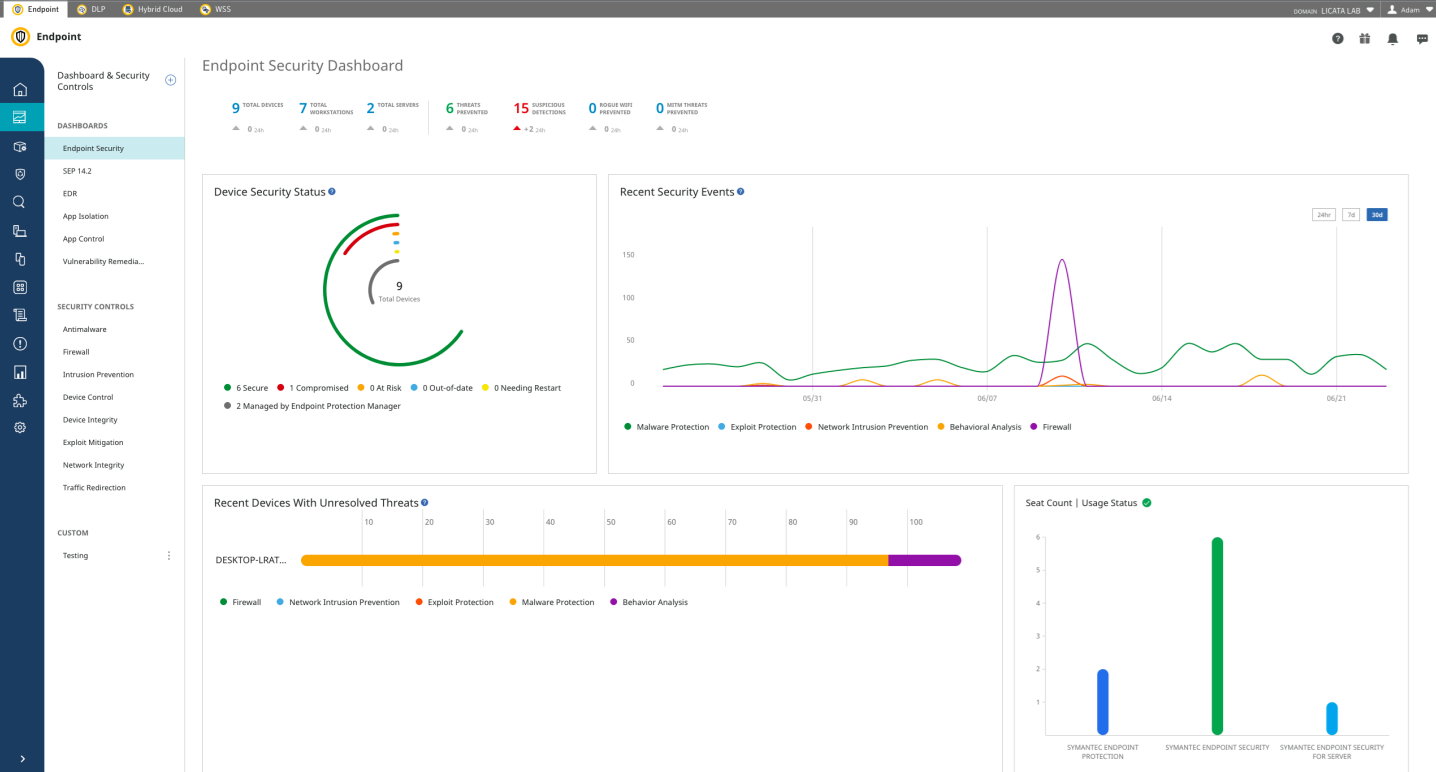
Symantec Endpoint Security Enterprise โปรแกรมแอนตี้ไวรัส สำหรับการใช้งานในองค์กรธุรกิจ มอบการปกป้องให้กับอุปกรณ์ปลายทาง (Endpoint) ไม่ว่าจะเป็นเครื่อง PC และเซิร์ฟเวอร์ รวมถึงสภาพแวดล้อมการใช้งานแบบเสมือน รองรับการใช้งานทั้งบน ระบบปฏิบัติการ Windows, Linux และ macOS โดยที่ตัวโปรแกรม Agent ที่ต้องติดตั้งลงในอุปกรณ์ปลายทาง มีขนาดเล็ก และไม่หน่วงการทำงานของเครื่อง และ Agent เพียงตัวเดียว สามารถให้การป้องกันแบบรอบด้านหลายระดับชั้น โดยไม่จำเป็นต้องติดตั้งโปรแกรมลงในเครื่องหลายตัว
นอกจากนี้ โปรแกรมแอนตี้ไวรัส สำหรับธุรกิจ ปกป้องหลายระดับ Symantec Endpoint Security Enterprise ยังรองรับการป้องกันอุปกรณ์พกพาบน ระบบปฏิบัติการ Android และ iOS อีกด้วย และโปรแกรมนี้เป็นผลงานการพัฒนาโปรแกรมของ บริษัท Symantec ที่มีโปรแกรมแอนตี้ไวรัสสำหรับธุรกิจให้เลือกใช้งานหลายรุ่น สำหรับหลายความต้องการ
โปรแกรมแอนตี้ไวรัส สำหรับธุรกิจ ปกป้องหลายระดับ Symantec Endpoint Security Enterprise ป้องกันอุปกรณ์จาก มัลแวร์ (Malware), ไวรัส (Virus), มัลแวร์เรียกค่าไถ่ (Ransomware) รวมถึงภัยคุกคามทั้งที่เป็นที่รู้จัก และภัยคุกคามเกิดใหม่ ด้วยการปกป้องแบบหลายระดับชั้น ด้วย Signatureless Technologies อาทิ การตรวจจับด้วย ระบบปัญญาประดิษฐ์ AI การวิเคราะห์พฤติกรรมของมัลแวร์ การปิดกั้นช่องโหว่ด้านความปลอดภัย การปิดกั้นการโจมตีผ่านระบบเครือข่าย (Intrusion Prevention) การวิเคราะห์ความน่าเชื่อถือของไฟล์ (Reputation Analysis) และเทคนิคด้านความปลอดภัยอื่น ๆ อีกมากมาย
สำหรับองค์กรธุรกิจ ที่ต้องการปกป้องอุปกรณ์บน Windows, macOS, Linux ทั้งในสภาพการทำงานแบบปกติ และสภาพการทำงานแบบเสมือน รวมถึงยังสามารถปกป้องอุปกรณ์พกพาบน ระบบปฏิบัติการ Android และ iOS ก็สามารถหาซื้อลิขสิทธิ์แท้ของ โปรแกรมแอนตี้ไวรัส สำหรับธุรกิจ ปกป้องหลายระดับ Symantec Endpoint Security Enterprise ได้ที่ ร้านขาย สินค้าไอที ไทยแวร์ช้อป (Thaiware Shop) แล้ววันนี้
คุณสมบัติ และ ความสามารถ (Features)
การปกป้องแบบหลายระดับชั้น
เทคโนโลยีการปกป้องหลายระดับชั้นที่มีอยู่ใน โปรแกรมแอนตี้ไวรัส สำหรับธุรกิจ ปกป้องหลายระดับ Symantec Endpoint Security Enterprise ทำงานแบบเรียลไทม์อย่างมีประสิทธิภาพเพื่อปกป้องอุปกรณ์ของคุณจากทั้งการโจมตีแบบ File-based และ Fileless เป็นการปกป้องที่ทำงานอยู่บนเทคโนโลยี AI และ การเรียนรู้ของเครื่องจักร (Machine Learning) รวมกับการตรวจจับบนระบบคลาวด์ เพื่อระบุภัยคุกคามในอุปกรณ์หลากหลายรูปแบบ หลากหลายระบบปฏิบัติการ ปิดกั้นการโจมตีแบบเรียลไทม์ ทำให้อุปกรณ์ปลายทางยังคงทำงานได้อย่างสมบูรณ์ และไม่ส่งผลกระทบเชิงลบกับระบบไอทีของธุรกิจ
ปกป้องมัลแวร์ระดับก้าวหน้า
ระบบการป้องกันมัลแวร์ของ โปรแกรมแอนตี้ไวรัส สำหรับธุรกิจ ปกป้องหลายระดับ Symantec Endpoint Security Enterprise เป็นการทำงานร่วมกันของ การตรวจจับ (Pre-execution Detection) และ การปิดกั้น (ฺBlocking) ทั้งมัลแวร์ใหม่ที่ยังไม่เป็นที่รู้จัก และมัลแวร์ที่รู้จักดี มีการทำ Sandbox เพื่อตรวจจับภัยคุกคามที่แฝงตัวมาในรูปแบบพิเศษ มีการมอนิเตอร์พฤติกรรมของไฟล์และปิดกั้นเมื่อพบความผิดปกติ มีการตรวจจับด้วยลายเซ็นของไวรัส รวมถึงการวิเคราะห์ความน่าเชื่อถือของไฟล์ เว็บไซต์ และการสแกนหามัลแวร์ในระบบ
ป้องกันการรั่วไหลข้อมูลสำคัญของธุรกิจ
โปรแกรมแอนตี้ไวรัส สำหรับธุรกิจ ปกป้องหลายระดับ Symantec Endpoint Security Enterprise มาพร้อมเทคโนโลยีที่ช่วยป้องกันการรั่วไหลข้อมูล Intrusion Prevention และ Firewall ที่ปิดกั้นมัลแวร์จากการโจมตีระบบเครือข่าย รวมถึงปิดกั้นมัลแวร์ที่โจมตีผ่าน โปรแกรมเว็บเบราว์เซอร์ ด้วยการกำหนดนโยบาย ร่วมกับการปิดกั้นการเข้าถึง IP ที่เป็นอันตรายด้วยระบบ Blacklisting
ใช้เหยื่อล่อเพื่อเปิดเผยการโจมตี
โปรแกรมแอนตี้ไวรัส สำหรับธุรกิจ ปกป้องหลายระดับ Symantec Endpoint Security Enterprise ยังมาพร้อมเทคนิคระดับสูงในการตรวจจับการโจมตีอย่างการทำ Deception ที่ทำการล่อลวง หรือการใช้เหยื่อล่อ เพื่อให้ภัยคุกคามเปิดเผยตัวออกมา ไม่ว่าจะเป็นการใช้ ไฟล์ปลอม รหัสผ่านปลอม การแชร์บนเครือข่าย ข้อมูลแคช รวมถึงการสร้างอุปกรณ์ปลายทางปลอมขึ้นมาในระบบเครือข่าย เพื่อใช้เป็นเหยื่อล่อการโจมตี เปิดเผยให้เห็นเป้าหมาย รวมถึงเปิดเผยเทคนิคที่ใช้ในการโจมตี ช่วยให้ปิดกั้นการโจมตีได้ทันก่อนที่จะเกิดขึ้นกับระบบและข้อมูลของจริง
ฟีเจอร์หลักของ Symantec Endpoint Security Enterprise
- Antivirus : สแกนและกำจัดมัลแวร์ ไวรัส รวมถึงภัยคุกคามอีกหลายแบบที่อยู่ในอยู่ในเครื่อง
- Firewall and Intrusion Prevention : ปิดกั้นมัลแวร์ที่แพร่กระจายผ่านระบบเครือข่ายก่อนที่จะเข้าไปในอุปกรณ์ รวมถึงควบคุมการสื่อสารข้อมูลผ่านระบบเครือข่าย
- Device Control : กำหนดได้ว่าอนุญาตหรือไม่อนุญาตให้ใช้งานอุปกรณ์ต่อพ่วงรูปแบบใดบ้าง ไม่ว่าจะเป็นอุปกรณ์ที่เชื่อมต่อผ่าน พอร์ต USB หรือ FireWire
- Exploit Prevention : ปิดกั้นช่องโหว่ทั้งในรูปแบบ Memory-based และ Zero-day ของซอฟต์แวร์ที่ติดตั้งอยู่ในอุปกรณ์
- Intensive Protection : ปรับแต่งความเข้มข้นในกระบวนการตรวจจับ และการปิดกั้นได้อย่างละเอียด เพื่อกำหนดระดับการป้องกัน และความสามารถในการเข้าถึงไฟล์ที่ต้องสงสัย
- Network Connection Security : ระบุเครือข่าย Wi-Fi ที่มีความประสงค์ร้าย ใช้เทคโนโลยีการตรวจสอบความน่าเชื่อถือของ Hotspot
- Host Integrity : ช่วยให้มั่นใจได้ว่าอุปกรณ์ได้รับการปกป้อง และสอดคล้องกับนโยบายการใช้งานขององค์กรธุรกิจ ตรวจจับการเปลี่ยนแปลงที่ไม่ได้รับอนุญาต ประเมินความเสียหาย รวมถึงสามารถแยกอุปกรณ์ที่ไม่สอดคล้องกับนโยบายความปลอดภัย เพื่อไม่ให้สร้างความเสียหายกับระบบคอมพิวเตอร์ของธุรกิจ
ความต้องการของระบบ (System Requirements)
Symantec Agent for Windows System Requirements
- OS :
- Windows Vista
- Windows 7
- Windows 8
- Windows 8.1
- Windows 10
- Windows 10 Anniversary
- Windows 10 Creators
- Windows 10 Fall Creators
- Windows 10 April 2018
- Windows 10 Oct 2018
- Windows 10 May 2019
- Windows 10 Nov 2019
- Windows 10 May 2020 2004/20H1
- Windows 10 Oct 2020 20H2
- Windows 10 May 2021 21H1
- Windows 10 Oct 2021 21H2
- Windows 10 Oct 2022 22H2
- Windows 11 Oct 2021 21H2
- Windows 11 Sept 2022 22H2
- Windows 11 Oct 2023 23H2
- Windows 11 24H2
- Windows 11 (21H2, 22H2) (Symantec Agent for Windows ARM system)
- Windows Server 2008 (RTM, SP1, SP2)
- Windows Server 2008 R2
- Windows Small Business Server 2011
- Windows Server 2012
- Windows Server 2012 R2
- Windows Server 2012 R2 (Apr. 2014)
- Windows Server 2012 R2 (Aug. 2014)
- Windows Server 2016
- Windows Server 2019
- Windows Server 2022
- CPU :
- Physical computers : 64-bit processor : 2 GHz. Pentium 4 with x86-64 support or equivalent minimum (Itanium processors are not supported.)
- Virtual computers : One virtual socket and one core per socket at 1 GHz. minimum (one virtual socket and two cores per socket at 2 GHz. recommended) (The hypervisor resource reservation must be enabled.)
- ARM system requirements :
- Ampere Altra Processor, 2999 MHz., 2 Cores, 2 Logical Processors
- Qualcomm Snapdragon 7c and later Compute Platform, 2985 MHz., 4 Core(s), 4 Logical Processor(s)
- RAM : 1 GB. (2 GB. recommended) or more if required by the operating system
- Display : 800 x 600 or larger
- Harddisk : 395 MB.
- Browser Intrusion Prevention : Browser Intrusion Prevention support is based on the version of the Client Intrusion Detection System (CIDS) engine.
- Google Chrome
- Mozilla Firefox
- Microsoft Edge
Symantec Agent for macOS System Requirements
- OS :
- macOS 10.13 High Sierra
- macOS 10.14 – 10.14.4 Mojave
- macOS 10.14.5 – 10.14.6 Mojave
- macOS 10.15 – 10.15.7 Catalina
- macOS 11.x Big Sur
- macOS 12.x Monterey
- macOS 13 Ventura
- macOS 14.x Sonoma
- macOS 15.x Sequoia
- CPU :
- 64-bit Intel Core 2 Duo or later
- Apple M1 chip (as of 14.3 RU2)
- Apple M2 chip (as of 14.3 RU5)
- RAM : 2 GB. of RAM
- Harddisk :
- 1 GB. of available hard disk space for the installation
- Running the Symantec Endpoint Protection Installer on a case-sensitive file system is unsupported.
- Display : 800 x 600
Symantec Agent for Linux System Requirements
- OS :
- Amazon Linux 2023
- Amazon Linux 2
- CentOS Linux 7, 8*
- CentOS Stream is not supported as of SEP 14.3 RU9
- Debian 10 (14.3 RU2 and later)
- Oracle Enterprise Linux 6, 7, 8*, 9
- Rocky Linux 8, 9
- Red Hat Enterprise Linux 7, 8*, 9
- Linux 6.x is not supported for a dual-managed single agent (e.g., DCS and SEP Linux). A standalone SEP Linux Agent (Symantec Endpoint Protection Manager-managed or cloud-managed) is supported on RHEL 6.x.
- SuSE Linux Enterprise Server 15.x
- Ubuntu 16.04 LTS, 18.04 LTS, 20.04 LTS, 22.04 LTS (as of 14.3 RU6), 24.04 LTS (as of 14.3 RU9 Update)
* If you are running RHEL/OEL/CentOS 8.x with FIPS mode enabled in dual-managed mode with a DCS agent, the agent is unable to communicate with the DCS Server. Communication is restored when you disable FIPS then restart the system.
- CPU :
- Physical : Intel Pentium 4 (2 GHz.) or equivalent with 2 cores, minimum (4 cores recommended)
- Virtua l: One virtual socket with 2 cores, minimum (4 cores recommended)
- RAM : 512 MB. of available RAM minimum (4 GB. recommended)
- Harddisk :
- 2 GB. available disk space if /var, /opt, and /tmp share the filesystem or volume
- 1 GB. available disk space in each /var, /opt, and /tmp if on different volumes
Symantec Agent for Android System Requirements
- OS : Android 5.0 or later
Symantec Agent for iOS/iPadOS System Requirements
- OS : iOS/iPadOS 9.0 or later
Browser support for cloud console access
- Google Chrome
- Microsoft Edge
- Mozilla Firefox
- Safari
- For all browsers, two most recent versions are supported.
- Browser support varies by operating system.
- The minimum resolution for supported browsers is 1,366x768.
เปรียบเทียบความแตกต่างระหว่างแต่ละเวอร์ชัน (Comparison Table)
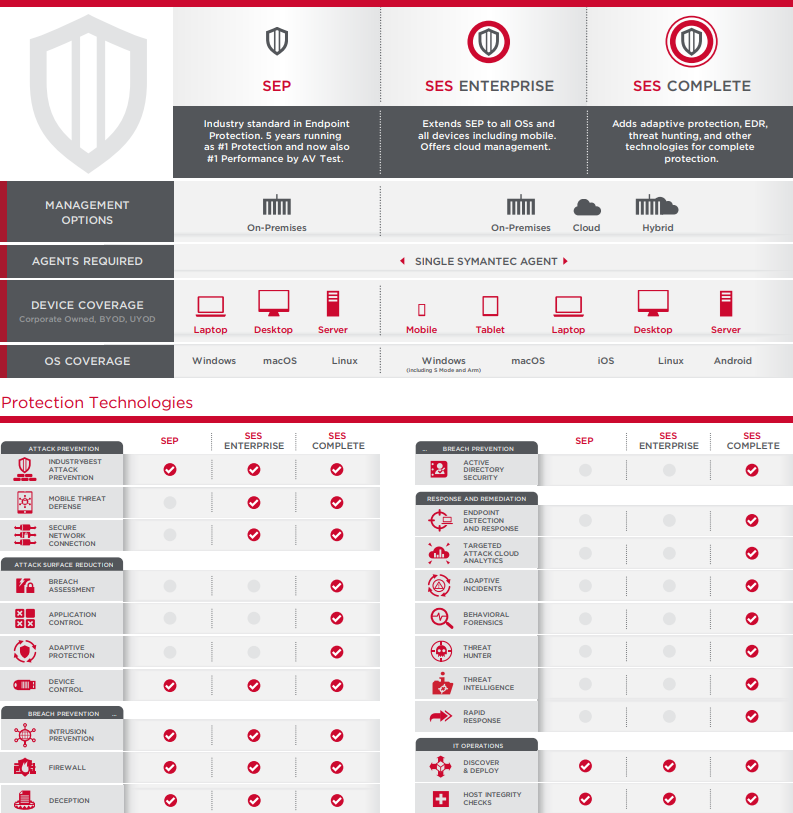
ตารางเปรียบเทียบความสามารถ โปรแกรมแอนตี้ไวรัส สำหรับธุรกิจ
Symantec Endpoint Security แต่ละเวอร์ชัน
ผลิตภัณฑ์ที่เกี่ยวข้อง