
ซอฟต์แวร์ (Software)
โซลูชันตามแบรนด์ (Brand-Specific Solutions)
-
 Minitab Solution(โซลูชันวิเคราะห์ข้อมูลสถิติเชิงลึก)
 -
 Easeus(โซลูชันกู้ สำรองข้อมูล | งานเอกสาร | มัลติมีเดีย)
 -
 Canva Business & Enterprise(โซลูชันออกแบบและสื่อสารด้วยภาพสำหรับองค์กร)
 -
 TeamViewer(โซลูชันควบคุมคอมพิวเตอร์ และทำงานระยะไกล)
 -
 GstarCAD(โซลูชัน CAD ออกแบบ 3D และ 2D)
 -
 Google Workspace(โซลูชันอีเมลและเครื่องมือทำงานสำหรับธุรกิจ)
 -
 ChatGPT Business(โซลูชัน AI สําหรับธุรกิจ ผู้ช่วยทุกแผนกในองค์กร)New
โซลูชันตามการใช้งาน (Specialized Solutions)
เมื่อ: 24 กรกฎาคม 2561
ผู้เข้าชม: 11,044
คะแนน:
ยังไม่มีคะแนน
HD Tune Pro
HD Tune Pro โปรแกรมช่วยแสกนอุปกรณ์ Hard Disk / SSD ของคุณ โดยสามารถใช้งานได้ทั้งคอมพิวเตอร์ตั้งโต๊ะและคอมพิวเตอร์พกพา ตัวโปรแกรมมากด้วยฟังก์ชั่น Utility ที่จะช่วยคุณจัดการประสิทธิภาพของ Drive สแกนเพื่อเช็ค Error ต่างๆ และเช็คในส่วนของ health status (S.M.A.R.T.) รวมถึงการป้องกันการลบข้อมูลต่างๆได้อย่างปลอดภัย
Key Features
- ตรวจเช็คสถานะความผิดปกติของฮาร์ดดิสก์ได้ดีเยี่ยม
- เช็คความเร็วในการอ่านการเขียนข้อมูล
- มีฟังก์ชั่น Quick Error Scan ใช้งานง่ายรวดเร็ว
- ระบบตรวจจับอุณหภูมิของฮาร์ดดิสก์ (Temperature Detection)
- ระบบ S.M.A.R.T เทคโนโลยีการรายงานสถิติ วิเคราะห์ ตรวจสอบอย่างละเอียด
- รองรับอุปกรณ์หลากหลายรูปแบบได้แก่
- ฮาร์ดดิสก์ภายใน (Internal Hard Disk)
- ฮาร์ดดิสก์ภายนอก (External Hard Disk)
- ฮาร์ดดิสก์แบบพกพา (Portable Hard Disk)
- ฮาร์ดดิสก์แบบ SSD (Solid-State Drive)
- แฟลชไดร์ฟ (USB Flash Drive)
- การ์ดหน่วยความจำ หรือ เมมโมรี่การ์ด (Memory Card)
- รองรับการปรับตั้งค่าความเร็วฮาร์ดดิสก์ Automatic acoustic management (AAM)
- รองรับการสแกนฮาร์ดดิส์ที่มีความจุมากกว่า 4TB+
- รองรับ USB 3.0 ที่มีการรับส่งข้อมูลของพอร์ต USB ที่รวดเร็วแล้ว
- แสดงชื่อยี่ห้อ บริษัทผู้ผลิต ชื่อรุ่น ประเภทของฮาร์ดดิสก์ ขนาดความจำ
- แสดงผลตารางสถิติอุณหภูมิของฮาร์ดดิสก์
- เพิ่มความสามารถถ่าย Screen Shot เซฟเป็น JPG ได้
- สามารถจัดการล้าง Format ฮาร์ดดิสก์ได้อย่างสะอาดหมดจด ไร้ร่องรอย
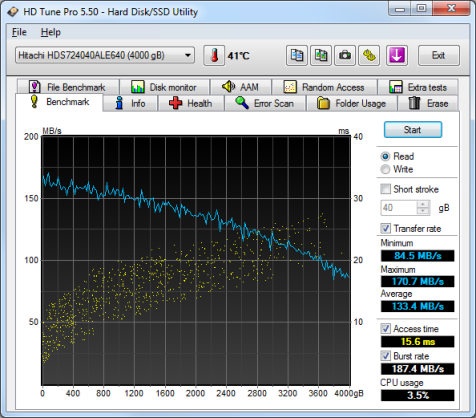
Features
- Added autosave screenshot function with extensive filter possibilities
- Error Scan
- added speed map
- added option to set scanning range
- Erase: added verify function
- Added option to change power settings during performance tests
- Added support for USB 3.0 devices
- Fixed negative CPU usage display with quadcore CPUs
- Fixed incompatibility issue with nVidida drivers under Windows 7 64-bit
- Fixed incompatibility issue with certain USB sticks
- Fixed incorrect position with Erase function with sector sizes larger than 512 bytes
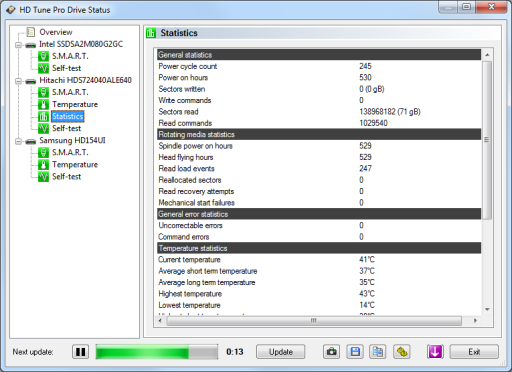
- Added temperature statistics
- Improved support for SSD
- Improved access time resolution
- Health
- added support for more SSDs
- Random access
- maximum access time is shown
- added 4 KB align option
- Extra tests
- added random seek 4 KB test
- added 4 KB align option
- New file tests which measure:
- sequential read/write speed
- random 4 KB read/write speed
- multiple random 4 KB read/write speed
- New monitor functions can show:
- detailed performance statistics of different block sizes
- positions where I/O activity took place
- which programs and processes generate I/O activity
- Improved support for +2TB disks
- Added option to scan A: and B: drives
- Added option to show drive serial number on main screen
- Fixed issue with Fahrenheit temperature display
- Added new module with following functions:
- Check health status of all connected drives at once
- Detailed S.M.A.R.T information
- Run S.M.A.R.T self-test
- Device statistics
- Temperature statistics
- Added support for more SSD drives
- Improved support for +4TB disks
- Added option to restore window position and size
- Added new warning level
- Improved temperature detection
- Save options:
- added option to export screenshot as jpg
- time and date format can be specified
- Added command line option to list all available drives
- Info: improved volume detection
- Folder Usage: improved volume detection
- General:
- added option to show drive letters in drive selector
- improved support for OCZ and Samsung SSDs
- added support for Windows 10
- Basic tests: added option for continuous testing
- Erase: range can be specified
- Monitor: transfer sizes of 128 KB to 2 MB added
- Save options: current pass can be specified
System Requirements
- Supported operating systems: Windows 7, Windows 8, Windows 10.
- Hardware requirements: hard disk (internal or external), SSD, USB stick, memory card reader.
- Note: due to hardware limitations some drives may not support all functions.
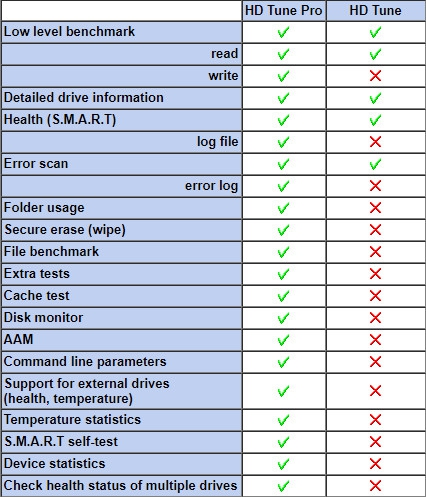
Comparison Free VS Pro
ผลิตภัณฑ์ที่เกี่ยวข้อง



ความคิดเห็น 0